
Hey there! If we haven't met yet, I'm Kevin, the new owner of Video Tap.
I took over the product a few months ago, and I've been heads-down shipping improvements ever since. Some of you may have already chatted with me through support, but I wanted to reassure everyone that Video Tap is still under active development.
Here’s what has changed so far:
🌟 New Features!
Smart Reframing
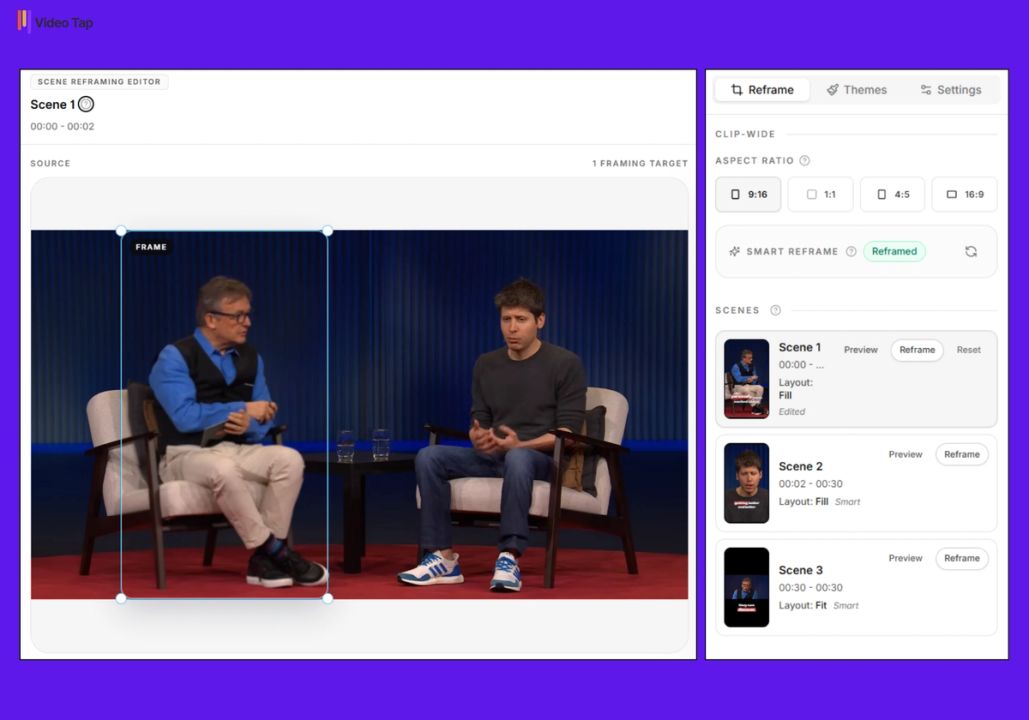
See it in action -> Smart Reframing
This is the one I'm most excited about.
Smart reframing automatically detects faces in your video clips and repositions the frame to keep subjects in view. This is especially useful when you're taking a wide (landscape) video and converting it to vertical for TikTok, Instagram Reels, or YouTube Shorts. Instead of awkwardly cropping and hoping the speaker stays in frame, the system tracks faces and adjusts the framing automatically.
The system picks the best layout for each scene: fill when there's one face, split for two, and fit when no face is detected. You can also manually adjust framing per scene if you want full control.
It’s not perfect yet but it will be an ongoing effort to improve this!
Smart reframing is available for paid plan subscribers only.
Multi-scene clipping
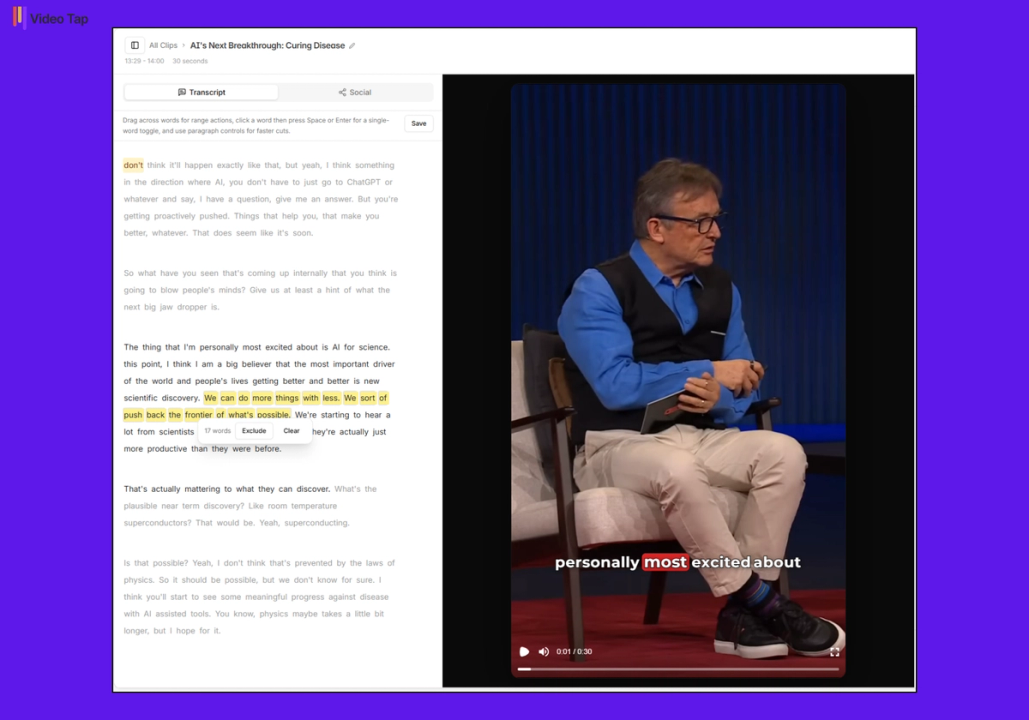
See it in action -> Multi-scene Clipping
The clip editor now supports splitting clips into multiple scenes. If there's a chunk of content mid-clip you want to skip, you can cut it out and stitch the rest together. The editor was rebuilt into a three-column workspace with a transcript view, scene controls, and a live preview, making the whole editing flow faster and more intuitive.
⚙️ Platform Upgrades
We made two big structural changes this month: a new rendering engine and a frontend rebuild.
We completely replaced the system that turns your clips into downloadable videos. The old engine (Creatomate) served us well, but we hit its limits, especially around reliability and customization. So we rebuilt clip rendering on Remotion, a framework that gives us way more control over the output. What this means:
More reliable renders. Failures that used to go undetected now get caught and reported immediately.
Better handling of large videos. Big source files now get pre-processed before rendering, so the system doesn't choke on them.
Aspect ratio flexibility. New clips automatically match your source video's shape, portrait, square, or wide, instead of forcing a default.
Snappier re-renders. If you update text on a clip, re-rendering should be more optimized.
We also added a redesigned preview screen with aspect-ratio switching, so you can see exactly how your clip will look in different formats before you export.
On the frontend, we rebuilt core pages (the dashboard, video pages, and content editors) using a more modern React-based tech stack called Inertia. Some Quality-of-Life improvements that came with this:
Collapsible mobile sidebar for a cleaner experience on smaller screens
Loading spinners on Regenerate buttons so you see progress now
Copy-confirmation feedback, when you copy something, you’ll see a confirmation
Faster autosave with fewer bugs
🐛 Bug fixes and polish
We also worked on some existing bugs that were reported:
Uploads hanging at 99%, this was a queue visibility issue where long-running background tasks could stall out. Fixed.
Broken team invites, invitations weren't being accepted properly. Fixed.
Clip download status, sometimes the app would say a clip was ready when it wasn't, or vice versa. Fixed.
Font loading in clips, some rendered clips had broken fonts. Fixed.
Direct download links, these weren't working in some cases. Fixed.
Share link speed, shared clip links now load faster thanks to a database optimization.
Render auto-retry, if a clip render fails due to a transient issue, the system now automatically retries instead of requiring a manual re-render.
Multilingual subtitle timestamps, clips with non-English subtitles could get mismatched timestamps. Fixed.
Arabic subtitle conversion, VTT to SRT conversion for Arabic subtitles was broken. Fixed.
Upload persistence, if you refresh or navigate away mid-upload, your progress is now preserved.
Upload size error message, the error was still saying 2 GB when the actual limit is 4 GB. Fixed.
What's next
We're continuing to polish and stabilize our app while prioritizing our AI-pilled users.
Expect a public API, CLI, and agent skills over the next couple of weeks. This means your OpenClaw, Claude Cowork, or other agents will be able to use and automate your Video Tap workflows in minutes!
As always, if you're running into any issues or have ideas for what we should build next, just reply to this email or reach out through the app. We read everything.
Thanks for sticking with Video Tap. We're a small team shipping fast, and your feedback is what keeps us pointed in the right direction.
Kevin Galang
Owner, Video Tap